
The free time tracker that turns your hours into compliant e-invoices.
Track time, bill clients, and send Peppol, ZUGFeRD or Factur-X invoices from your own server — no per-seat fees.
GPL-3.0 · Your hours, your server, no per-seat fees. · Demo needs no signup.
Bring your Toggl / Clockify history with you →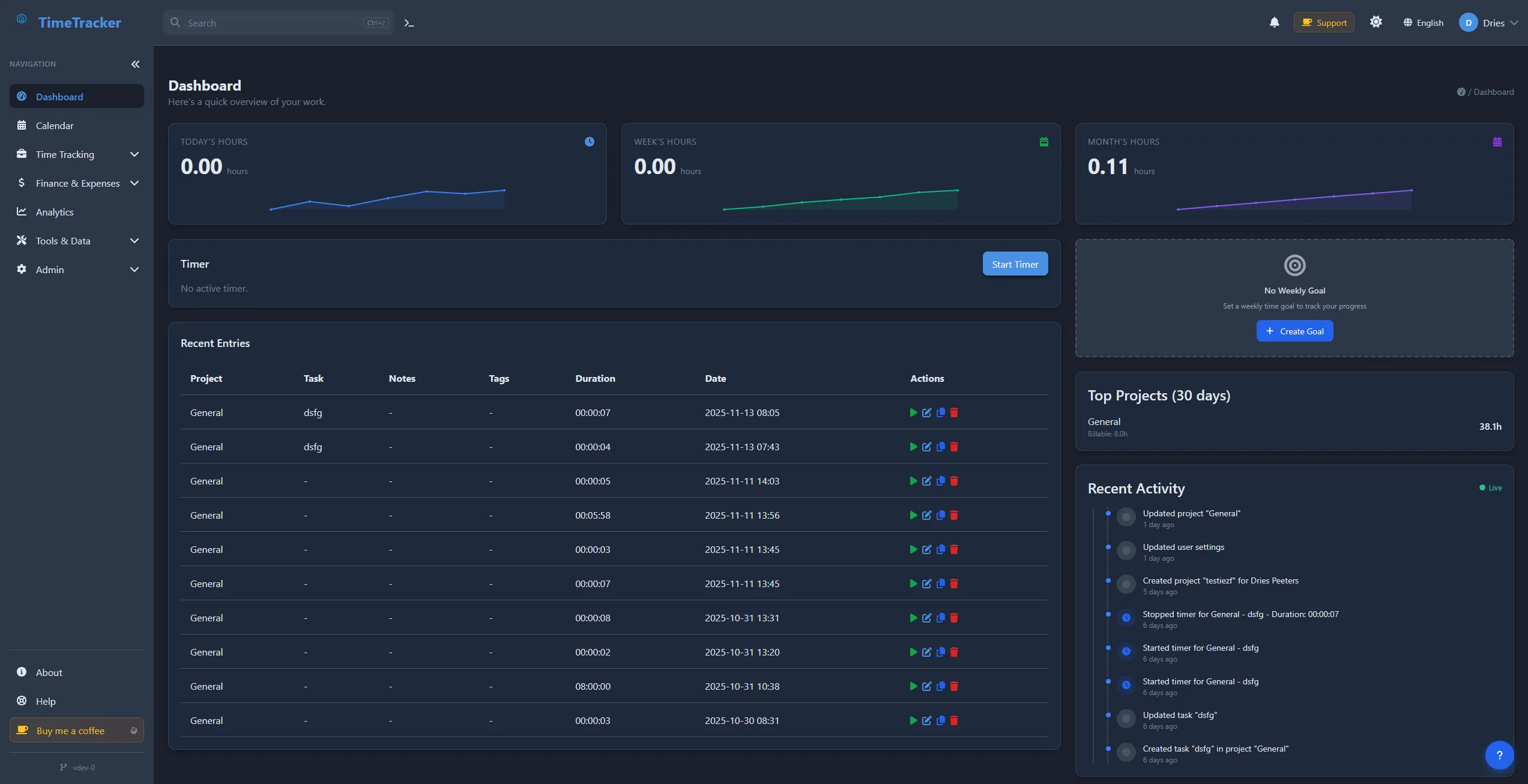
Start in the way that fits you
Try it first, deploy with one click, or self-host with Docker. Same product either way.
Try the live demo
Click around a full instance in about two minutes. No account required.
2Deploy with one click
Spin up a free managed instance on Render — ideal if you are not ready for a VPS yet.
3Self-host with Docker
About five minutes on a VPS, NAS, or homelab with Docker Compose.
Bring your history with you — import from Toggl or Clockify CSV →
Maintained in the open
Signals you can verify on GitHub and container registries — not marketing fluff.
Using TimeTracker in production? Share a short note at info@drytrix.com — we publish real stories only.
E-invoicing included — Peppol ready for Belgium and the EU
Hours become EN 16931 invoices without a separate paid add-on. TimeTracker can send Peppol (UBL) and embed Factur-X / ZUGFeRD data in PDFs — built with the Belgian B2B mandate in mind, on your own server.

From hours to invoice
One product for capture, collaboration, and billing — usually live in an afternoon.
Deploy once
Demo, Render, or Docker Compose on your own hardware — same GPL-3.0 app.
Deployment guide →Invite your team
RBAC, shared clients, and projects without a spreadsheet of seat renewals.
Team features →Track & invoice
Timers or manual entries become PDF or e-invoices with status tracking.
Try it live →What is TimeTracker?
A self-hosted web app for freelancers and small teams: timers, Kanban, expenses, mileage, and client-ready invoices under your domain. When GDPR or client contracts say “no external time SaaS,” you still get a modern product. Try the live demo →
What you get
Capture, report, and bill in one codebase — without reconciling three SaaS exports.
Smart time tracking
One-click timers, persistent server-side tracking, idle detection, and manual entry.
Projects & Kanban
Unlimited projects and tasks, client management, boards, and budget tracking.
Professional invoicing
Generate invoices from tracked time, PDF export, multi-currency — plus Peppol / Factur-X / ZUGFeRD.
Reports & exports
Dashboards, detailed reports, CSV export, and budget forecasting.
Multi-user security
Role-based access, audit logs, and data that stays on your server.
Expenses & mileage
Track costs alongside hours so invoices match the real work.
View all features → · See screenshots → · Compare alternatives →
The product, not stock photos
Dashboard, invoices, Kanban, and reports — the same UI as the live demo.


Common questions
Short answers — see the full FAQ for detail.
Is TimeTracker really free and open source?
Yes! TimeTracker is completely free and open source, released under the GPL-3.0 license. You can use it, modify it, and distribute it without any cost. There are no hidden fees, subscriptions, or premium features locked behind a paywall. An optional one-time €25 Supporter key funds development and adds a badge, clean client PDFs, and quieter prompts — features stay unlocked either way.
Do I need technical knowledge to set up TimeTracker?
Basic technical knowledge helps, but TimeTracker is designed to be easy to deploy. If you're comfortable with Docker, you can have it running in minutes. We provide comprehensive documentation and step-by-step guides to help you get started, even if you're not a developer.
What are the system requirements for self-hosting?
TimeTracker has minimal requirements. You need a server with Docker support, at least 512MB RAM, and a few GB of storage. It works on Linux, Windows (with WSL), and macOS. The application uses SQLite by default, but you can also use PostgreSQL for larger deployments.
Can I use TimeTracker for multiple clients or projects?
Absolutely! TimeTracker supports unlimited projects, tasks, and clients. You can organize your work by client, project, or task, track time for each separately, and generate invoices for specific clients or projects. Perfect for freelancers and agencies managing multiple clients.
How does the invoicing feature work?
TimeTracker's invoicing feature lets you generate professional invoices directly from your tracked time. You can select specific time entries, add expenses, set hourly rates, and export invoices as PDF. The system tracks invoice status (draft, sent, paid) and supports multiple currencies.
See it first. Install when you’re ready.
Open the live demo (no signup), deploy on Render, or self-host with Docker in about five minutes.
100% free · GPL-3.0 · no credit card · no signup