Self-Hosted Time Tracking
That You Control
Track time. Manage projects. Generate invoices. All in one place.
Free, open source, and runs entirely on your server. No subscriptions. No data sharing. Complete privacy.
What is TimeTracker?
TimeTracker is a self-hosted, web-based time tracking application designed for freelancers, teams, and businesses who want complete control over their data. Built with privacy and flexibility in mind, it offers a comprehensive solution for tracking time, managing projects, and generating professional invoices.
Unlike cloud-based alternatives, TimeTracker runs entirely on your infrastructure, ensuring your sensitive business data never leaves your control. With over 120 features and regular updates, it's a complete project management and time tracking solution.
Self-hosted
Your data, your server
Open Source
Free to use & modify
Feature-rich
120+ features included
Privacy-focused
Complete data control
Key Features
Everything you need for professional time tracking and project management
Smart Time Tracking
One-click timers, persistent server-side tracking, idle detection, and manual entry options for complete flexibility.
Project & Task Management
Unlimited projects and tasks, client management, Kanban boards, and budget tracking all in one place.
Professional Invoicing
Generate invoices directly from tracked time, export to PDF, support multiple currencies, and track payment status.
Analytics & Reporting
Visual dashboards, detailed reports, CSV export, and budget forecasting to make data-driven decisions.
Multi-User & Security
Role-based access control, self-hosted security, flexible authentication options, and comprehensive audit logs.
Financial Management
Track expenses, manage payments, log mileage, and handle multiple currencies for complete financial oversight.
Support TimeTracker Development
TimeTracker is free and open source. If you find it useful, consider supporting the project!
Why Not Toggl, Clockify, or Harvest?
TimeTracker gives you everything they offer, plus complete control and privacy
No Subscription Fees
Unlike Toggl, Clockify, and Harvest, TimeTracker is completely free. No per-user pricing, no feature limits, no monthly fees.
- One-time setup, zero recurring costs
- Unlimited users and projects
- All features included
Complete Data Control
Your data never leaves your server. No cloud storage, no third-party analytics, no data sharing with advertisers.
- Self-hosted on your infrastructure
- GDPR compliant by design
- Full backup control
Persistent Timers
Unlike browser-based timers that stop when you close a tab, TimeTracker's timers run server-side and never stop.
- Server-side timer persistence
- Works across devices
- Never lose tracked time
Built-in Invoicing
While competitors require integrations or separate tools, TimeTracker includes professional invoicing built right in.
- Generate invoices from tracked time
- PDF export included
- Multiple currencies supported
- No third-party services needed
Can I Self-Host Easily?
Yes! TimeTracker is designed for easy deployment, even if you're not a developer.
Docker Deployment (Recommended)
If you have Docker installed, you can have TimeTracker running in under 5 minutes. No complex configuration needed.
# Single command deployment
docker-compose -f docker-compose.local-test.yml up --build
# Access at http://localhost:8080
Minimal Requirements
512MB RAM, Docker support, a few GB storage
Works Everywhere
Linux, Windows (WSL), macOS, Raspberry Pi, VPS, cloud servers
No Database Setup
SQLite included by default, PostgreSQL optional for scale
Getting Help
We provide comprehensive documentation and community support to help you get started.
Who is TimeTracker For?
Perfect for individuals, teams, and organizations of all sizes
Whether you're a freelancer tracking billable hours, a team managing multiple projects, or an organization requiring data privacy, TimeTracker adapts to your needs.
For Freelancers
Track time across multiple clients, generate professional invoices, and understand how you allocate your time to maximize productivity and profitability.
- Track time across multiple clients
- Generate professional invoices
- Understand time allocation
- Export reports for tax purposes
For Teams
Assign tasks, track team productivity, generate comprehensive reports, and ensure everyone stays on track with project deadlines.
- Assign and track tasks
- Monitor team productivity
- Generate team reports
- Role-based access control
For Agencies
Manage multiple clients, track billable hours accurately, analyze profitability per project, and streamline your billing process.
- Manage multiple clients
- Track billable hours
- Analyze profitability
- Budget tracking per project
For Privacy-Focused Organizations
Self-hosted solution with complete data control, no third-party dependencies, and full compliance with data protection regulations.
- Self-hosted solution
- Complete data control
- No third-party dependencies
- GDPR compliant
See TimeTracker in Action
Explore the interface and discover the features that make TimeTracker powerful
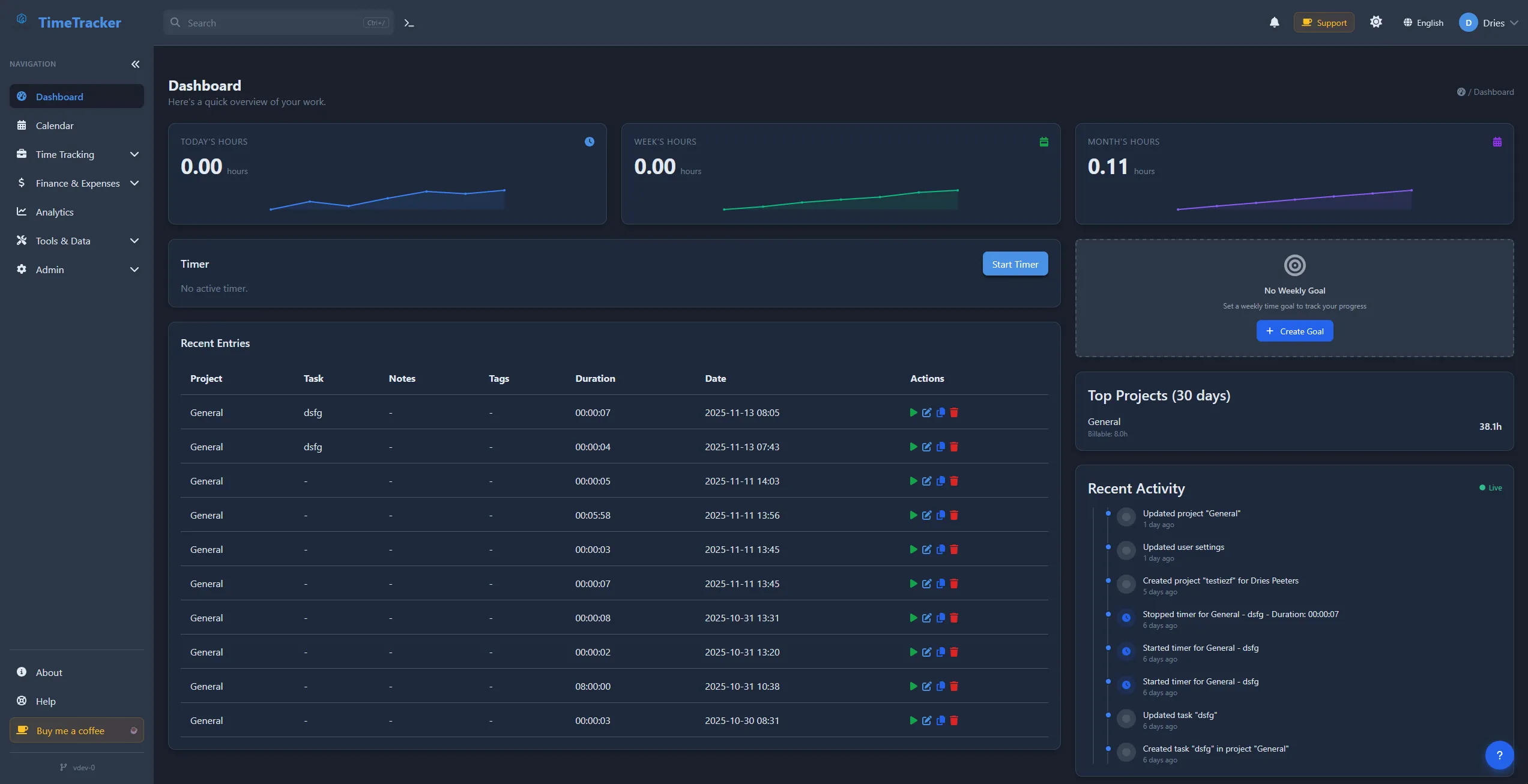
Dashboard
Overview of your projects and time
Projects
Manage all your projects
Timer
Track time with ease
Reports
Detailed analytics and insights
Invoices
Generate professional invoices
Kanban Board
Visual task management
Why TimeTracker?
Compare TimeTracker with traditional time tracking solutions
| Feature | TimeTracker | Traditional Time Trackers |
|---|---|---|
| Self-Hosted | Cloud-only, subscription fees | |
| Open Source | Proprietary, locked features | |
| Persistent Timers | Browser-dependent | |
| Docker Ready | Complex setup | |
| Invoicing Built-in | Requires integration | |
| No User Limits | Per-user pricing |
No Subscription Fees
One-time setup, no recurring costs
Complete Customization
Modify to fit your needs
Community-Driven
Active development community
Regular Updates
Continuous improvements
Technical Highlights
Built with modern technologies for reliability and performance
Technology Stack
Technical Features
- Self-hosted deployment
- Docker containerization
- Multi-database support
- RESTful API
- Real-time updates (WebSocket)
- PWA support
- Multi-language support (i18n)
- Dark mode
- Responsive design
Frequently Asked Questions
Common questions about TimeTracker
Is TimeTracker really free and open source?
Yes! TimeTracker is completely free and open source, released under the GPL-3.0 license. You can use it, modify it, and distribute it without any cost. There are no hidden fees, subscriptions, or premium features locked behind a paywall.
Do I need technical knowledge to set up TimeTracker?
Basic technical knowledge helps, but TimeTracker is designed to be easy to deploy. If you're comfortable with Docker, you can have it running in minutes. We provide comprehensive documentation and step-by-step guides to help you get started, even if you're not a developer.
What are the system requirements for self-hosting?
TimeTracker has minimal requirements. You need a server with Docker support, at least 512MB RAM, and a few GB of storage. It works on Linux, Windows (with WSL), and macOS. The application uses SQLite by default, but you can also use PostgreSQL for larger deployments.
Can I use TimeTracker for multiple clients or projects?
Absolutely! TimeTracker supports unlimited projects, tasks, and clients. You can organize your work by client, project, or task, track time for each separately, and generate invoices for specific clients or projects. Perfect for freelancers and agencies managing multiple clients.
How does the invoicing feature work?
TimeTracker's invoicing feature lets you generate professional invoices directly from your tracked time. You can select specific time entries, add expenses, set hourly rates, and export invoices as PDF. The system tracks invoice status (draft, sent, paid) and supports multiple currencies.
Is my data secure with TimeTracker?
Yes! Since TimeTracker is self-hosted, your data never leaves your server. You have complete control over your data, backups, and security. The application includes role-based access control, audit logs, and supports secure authentication methods. Your sensitive business data stays private.
Can multiple team members use TimeTracker?
Yes! TimeTracker supports unlimited users with role-based access control. You can assign different roles (admin, manager, user) with appropriate permissions. Team members can track their own time, view assigned projects, and managers can see team reports. Perfect for teams of any size.
How do I get support or report issues?
You can get help through our GitHub repository. Report bugs or request features on GitHub Issues, participate in discussions, or check the documentation. For direct contact, email us at info@drytrix.com. Community support is also available through GitHub Discussions.
Getting Started
Get TimeTracker up and running in minutes
Quick Start
# Clone the repository
git clone https://github.com/drytrix/TimeTracker.git
cd TimeTracker
# Start with Docker
docker-compose -f docker-compose.local-test.yml up --build
# Access at http://localhost:8080
Need more help? Check out the documentation or contact us:
Need Help Getting Started?
We're here to help! Get support through our community or reach out directly.